mirror of
https://github.com/Carve/qbittorrent-webui-cjratliff.com.git
synced 2026-09-12 09:21:35 -04:00
[GH-8] Sorting broken when using WebUI #60
Labels
No labels
UX
bug
can not replicate
documentation
duplicate
enhancement
fixed
good first issue
help wanted
invalid
looking Into It
question
wontfix
No milestone
No project
No assignees
1 participant

Notifications
Due date
No due date set.
Dependencies
No dependencies set.
Reference
cj/qbittorrent-webui-cjratliff.com#60
Loading…
Add table
Add a link
Reference in a new issue
No description provided.
Delete branch "%!s()"
Deleting a branch is permanent. Although the deleted branch may continue to exist for a short time before it actually gets removed, it CANNOT be undone in most cases. Continue?
Mirrored from GitHub issue #8
Original author: @icenine9
Created at: 2023-03-30T22:56:13Z
Labels:
bughelp wantedfixedMilestone: 1.2.2
Assignees: @Carve
Description
Despite clearing cache, sorting appears to be broken.
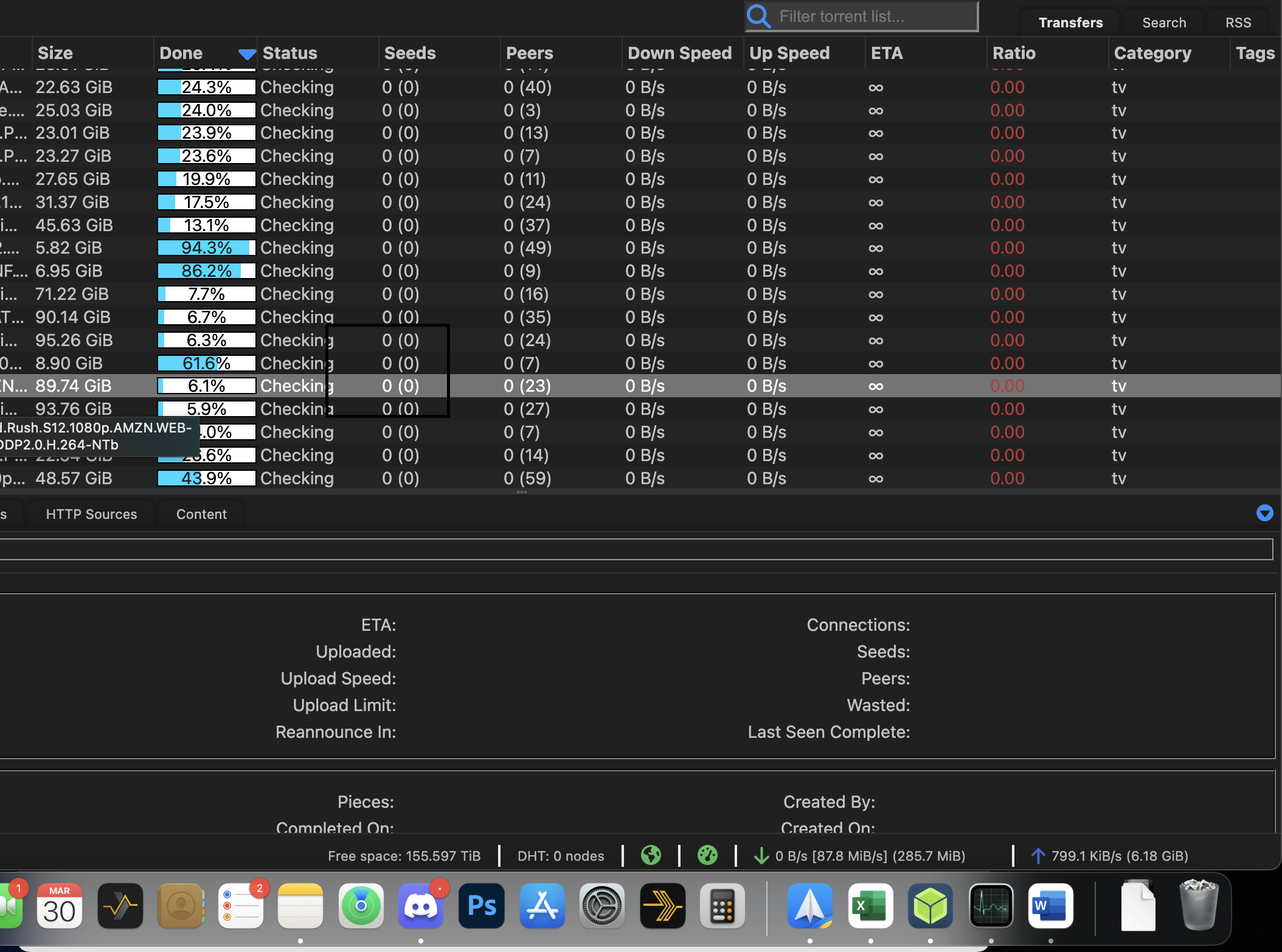
qbittorrent-nox 4.5.2 on ubuntu 22.10 (kernel 6.2.2 mainline). Note screenshot showing that sort is set to descending, yet percentages are obviously not in descending order.
Mirrored from GitHub comment by @WalzingMatilda
Created at: 2023-03-31T20:25:37Z
Same here.
On Other columns, it seems that I can sort in ascendant/descendant order without any problem... so it seems to be a progress_bar problem only.
Mirrored from GitHub comment by @Carve
Created at: 2023-04-02T18:23:53Z
What OS and qbit ?
Mirrored from GitHub comment by @Carve
Created at: 2023-04-03T16:32:32Z
Does this problem still occur without the use of my theme for you?
Do you have any errors in your browser console?
Mirrored from GitHub comment by @icenine9
Created at: 2023-04-03T16:42:04Z
No, problem only occurs when using your theme.
And there is one error on the console:
DevTools failed to load source map: Could not load content for chrome-extension://jpdapbcmfllbpojmkefcikllfeoahglb/content_start/bundle.js.map: System error: net::ERR_BLOCKED_BY_CLIENT
That error appears in other sites as well, every one it seems. I'm guessing it has to do with the bypass-paywall plugin that I have manually installed, so i'm not sure if it's contributing to this problem or not.
Mirrored from GitHub comment by @Carve
Created at: 2023-04-03T16:53:59Z
ok, thanks for the additional info. I will assume since it works with the extension and NOT using my theme then it isn't a problem with the extension, however.. if you want you could try to disable the extension and see if it sorting worked then, my guess will be probably not.
I haven't been able to replicate the issue, but I am setting up a Ubuntu 22 (deskop) today. Are you running any special variant of Ubuntu or just the normal one with the normal window manager?
Mirrored from GitHub comment by @icenine9
Created at: 2023-04-03T16:57:33Z
Nothing special aside from using qbittorrent-nox which has no UI (web interface only)
On Apr 3, 2023 at 12:54 PM -0400, CJ Ratliff @.***>, wrote:
Mirrored from GitHub comment by @WalzingMatilda
Created at: 2023-04-04T22:35:11Z
I have qbitorrent 4.5.2 (with gui) on a linux mint 21.3 server.
I'm using WebUI via LAN on a ubuntu 20.04 and firefox
the only thing I can see on thebrowser console is this message:
This site appears to use a scroll-linked positioning effect. This may not work well with asynchronous panning; see https://firefox-source-docs.mozilla.org/performance/scroll-linked_effects.html for further details and to join the discussion on related tools and features!
but I only get this one time in a random moment: refreshing page (ctrl + R) and sorting columns doesn't seem to produce anything strange on the browser console.
Then I tested it on Chromium;
The sorting problem is the same, but it complains about the javascript framework you use:
Starting in Chrome 101, the amount of information available in the User Agent string will be reduced.
To fix this issue, replace the usage of navigator.userAgent, navigator.appVersion, and navigator.platform with feature detection, progressive enhancement, or migrate to navigator.userAgentData.
Note that for performance reasons, only the first access to one of the properties is shown._
_AFFECTED RESOURCES
MooTools-Core-1.6.0-compat-compressed.js_
Hope this can help.
more about this:
https://blog.chromium.org/2021/09/user-agent-reduction-origin-trial-and-dates.html
EDIT:
I just checked and I can say the the sorting problem on the progress bar happens on the main bar only.
if I select a torrent with numerous files inside it, then press "content" and try to order the files in ascending or descending order, it works perfectly.
In other words I can't sort torrents' progress bar, but I can sort perfectly files' progress bar
Mirrored from GitHub comment by @Carve
Created at: 2023-04-05T02:08:46Z
I've got Ubuntu 22 LTS installed and testing the webui and have not been able to replicate the issue at hand. I'm determined to replicate this issue so I can get it fixed.
Mirrored from GitHub comment by @WalzingMatilda
Created at: 2023-04-06T09:25:42Z
I just tried a different approach:
ubuntu 20.04
qbittorrent 4.3.9 (with gui)
WebUi on localhost (just to simplify my setup)
Same thing appened.
I think it has something to do with bubble sorting and decimal point:
when I sort torrents on 4.3.9 I have:
100.0
100.0
100.0
9.9
98.6
75.1
so perhaps when figures are only 2, it ignores the decimal point?
on the other setup (the one I was talking about in my previous post), with different torrents and on a 4.5.2 release:
100.0
100.0
100.0
100.0
2.5
1.9
10.1
94.3
92.8
80.2
75.7
64.1
5.7
45.5
39.4
15.4
0.0
so, if I read 25 instead of 2.5, 19 instead of 1.9, I can spot a kind of sorting: 25 - 19 - 10.1;
same thing if I read 5.7 as 57;
The only mistery is why 25 19 10.1 are out of order.
Any chance you know where this figures can be manipulated? It would be interesting to have a format on 4 figures (for example: 001.0) just to see if the problem disappear.....
P.S.
my last experiment:
I try to access this setup directly on my mint 21.3 (I think is based on ubuntu 22) using firefox and localhost;
same exact order!!
I suppose you are using qbitorrent last release.... and it works on yours.... I don't understand.....
P.S.
I just noticed that the only torrent currently in download (the one at 80.2 , now at 80.5), every now and then, with no mouse hovering of any kind and with no regular interval of time, jumps from its position and it goes down between 39.4 and 15.4 and then return to its original position: this behavior, without any change of the figures.
The last thing: if I sort the progress bar in the ascending position, it reverses perfectly the order I showed you, and even the torrent in download jumps in the same way.....
Mirrored from GitHub comment by @WalzingMatilda
Created at: 2023-04-06T09:44:24Z
just saw the image icenine9 posted.
Two main blocks of sorting.....
the only one absolutely out of any logic seems to be 61.6.....
but if you move the decimal point, it would fit: 6.3 - 6.16 - 6.1........
Mirrored from GitHub comment by @Carve
Created at: 2023-05-02T13:24:13Z
@WalzingMatilda @icenine9 Just to confirm; you don't have this error with the default webUI theme? (I ask because my theme is based on the default theme)
Mirrored from GitHub comment by @icenine9
Created at: 2023-05-02T16:01:19Z
Correct.
On Apr 6, 2023 at 5:44 AM -0400, WalzingMatilda @.***>, wrote:
Mirrored from GitHub comment by @WalzingMatilda
Created at: 2023-05-06T14:25:09Z
No, that work as expected....
Mirrored from GitHub comment by @Carve
Created at: 2023-05-08T12:35:38Z
Thanks for the updates. I'm working on the resolution for this
Mirrored from GitHub comment by @Carve
Created at: 2023-07-18T16:03:13Z
Fixed with today's update. Sorry it took longer than anticipated
Mirrored from GitHub comment by @icenine9
Created at: 2023-07-18T16:04:23Z
Cmon now, share what the problem was 😊
Mirrored from GitHub comment by @Carve
Created at: 2023-07-18T16:08:06Z
The problem was in one of the Libraries (and a core change). Updating the Libraries to the latest used by the src in qBittorrent and the JavaScript for the sorting and it now works as intended. Nothing fancy really 🤣
Mirrored from GitHub comment by @icenine9
Created at: 2023-07-18T16:11:23Z
Confirmed! Thanks so much for fixing this. It's now the perfect webui :)
Mirrored from GitHub comment by @Carve
Created at: 2023-07-18T16:14:03Z
My pleasure!
Mirrored from GitHub comment by @WalzingMatilda
Created at: 2023-08-08T14:03:08Z
Confirmed! work for me too!
The only thing I noticed is that now the color parameters inside the progressbar.js file seems to be partially ignored:
I can't change the text color to white like in the previous version(I have a really annoying problem with display brightness, so I "darkened" your skin a bit more - file attached). Only if you know what's going on without having to test it yourself.
It's good this way for me...